Build an Argument Map - Interactive Tool for Critical Thinking
This is an argument mapping tool that I have created to use in my teaching. It is freely available to use but please give me credit for it.
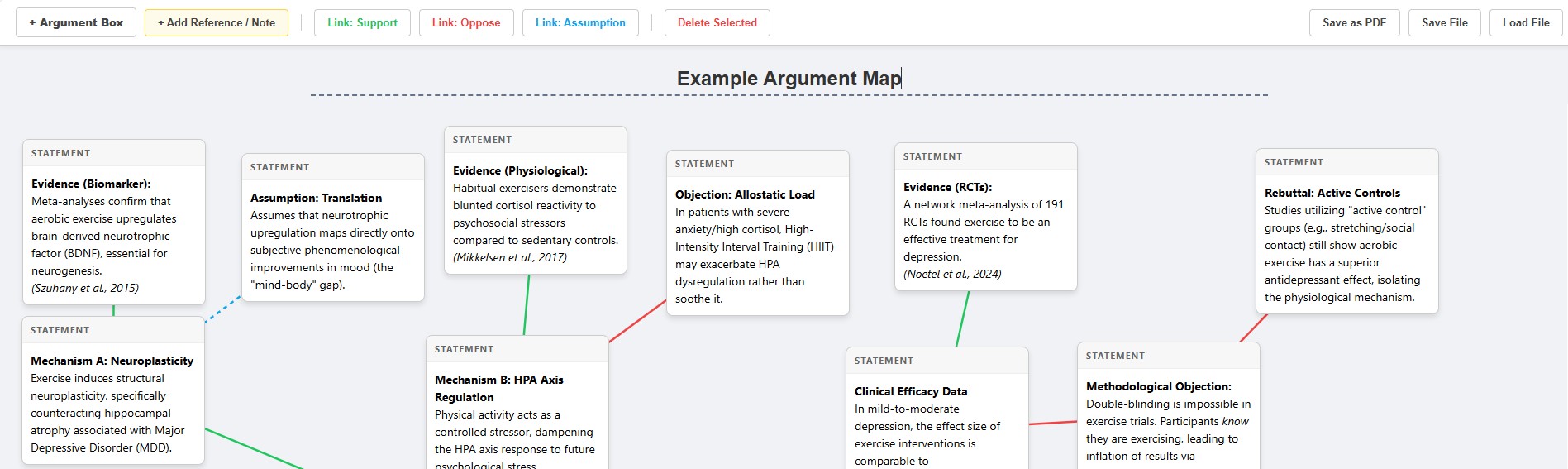
How to use the Argument Mapping Tool:
- Open the Tool: Click on the link above to open it in your web browser.
- Add Your Title: Type the topic or question at the very top where it says “Untitled Argument Diagram.”
- Create Boxes:
- Click + Argument Box to add a claim, premise, or evidence.
- Click + Add Reference / Note to add citations or bibliography.
- Note: To move a box, click and drag the Grey Header bar. To type, click inside the white box.
- Connect Your Ideas:
- Click a Link button (e.g., Link: Support).
- Step 1: Click the Reason (the starting box).
- Step 2: Click the Conclusion (the target box).
- Tip: Green = Supports; Red = Opposes; Blue = Assumption.
- Save Your Work:
- To Submit/Edit Later: Click Save File. This downloads a file to your computer. Keep this safe! You can load it back in later using the “Load File” button.
- To Print: Click Save as PDF to generate a printable version.
If you use this tool for your work or teaching, please give credit to Dr Emily Ryall for its creation.